
A coding agent.
Nothing extra.
A lean coding agent in VS Code’s side bar. It reads, searches and edits your code, and talks only to the OpenAI-compatible endpoint you choose.
- ✦Ten tools, no shell
- ✦Every edit can be undone
- ✦Only your endpoint
- ✦No telemetry
An agent beside your editor.
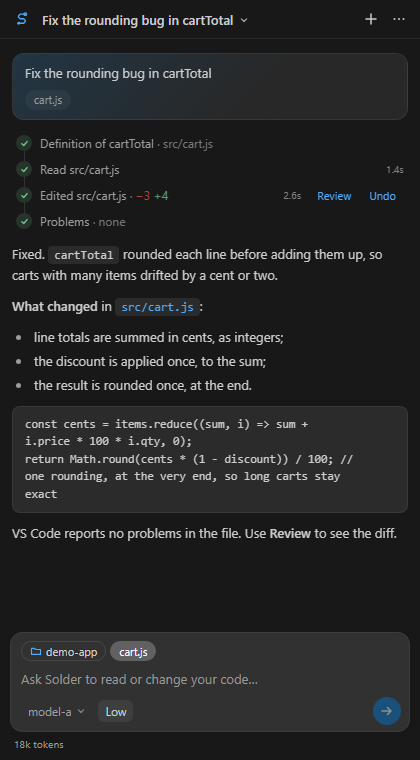
Solder sits in VS Code’s side bar. Ask about your code, or ask for a change. It reads files, finds symbols, searches the workspace and edits files, then reports any new errors VS Code finds.
It’s built for people who work in VS Code all day, including on locked-down work PCs where the only AI allowed is the company’s own gateway. Point Solder at that gateway, or at a server on your own PC. It needs nothing else.
It never runs commands. When something needs building or testing, it says what to run, and you run it.
Lean by design.
- 01Ten purpose-built tools
- 02No shell, ever
- 03Review and Undo on every edit
- 04Only your endpoint is contacted
Focused tools. Zero bloat.
Ten tools built for code, on VS Code’s own APIs.
Ten tools, no shell
Read, outline, search, find, see git changes, edit, write, move, delete, and list problems. It never runs commands.
Review and Undo
Every edit can be reviewed in VS Code’s diff and undone. Undo puts the file back, and Solder is told.
It asks first
Before deleting anything, or changing a file outside the workspace. You can add a note when you answer.
Searches your own docs
Point it at folders of in-house docs: APIs, specs, schematics. Plain text, Word, Excel and PowerPoint, indexed on your PC.
Guided setup
It asks for your endpoint, your key, your model, and, if you like, your docs folders and a few rules. It checks the key by listing the models.
Start in one click
Cards on a new chat: summarize the codebase, explain or fix a script, clean up, learn something, or review your changes.
Right-click Explain or Fix
Select code, right-click, and choose Solder → Explain this, Fix this, or Add to chat. Fix sends VS Code’s problems in the selection too.
Careful with tokens
A token meter in the panel, and the allowance left in the status bar when your gateway reports one. It trims old tool output and summarizes long chats.
Your theme’s colors
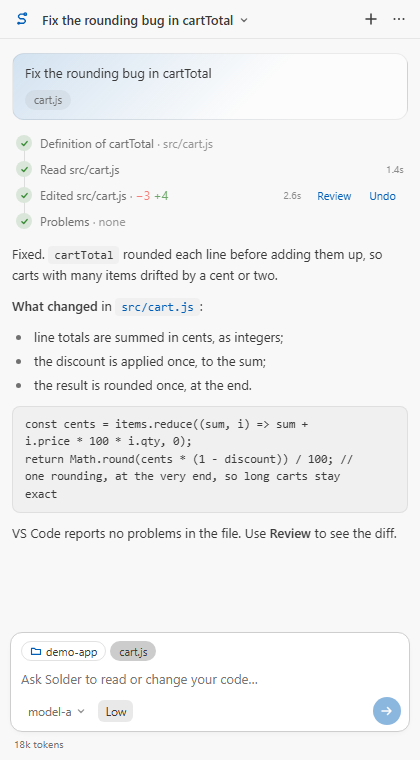
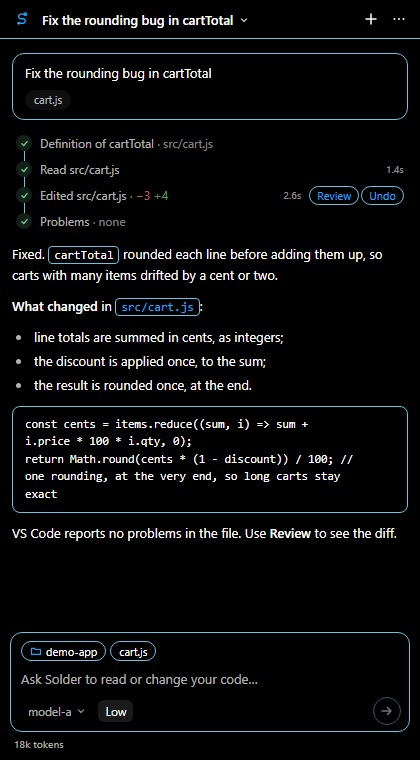
It uses your VS Code theme, light, dark or high contrast.
Every step, in plain sight.
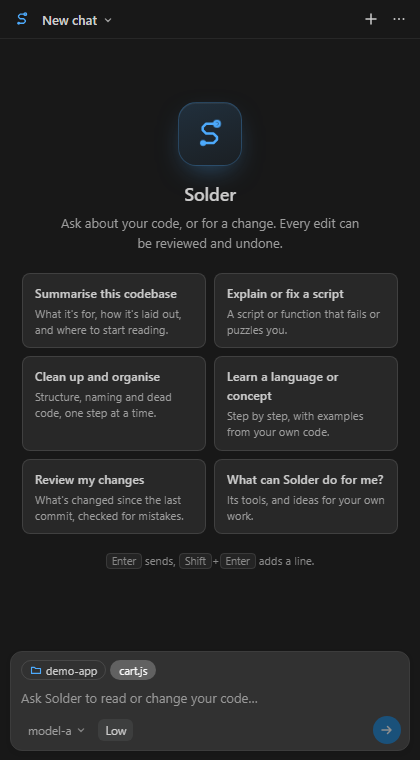
Start in one click.
A new chat offers cards for common jobs.
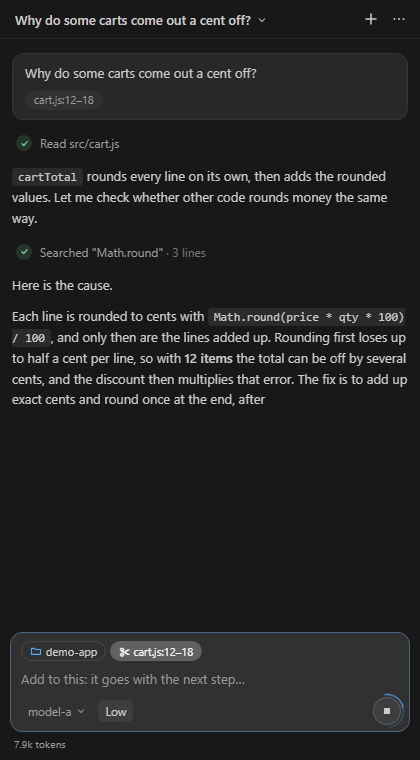
Answers as it works.
Each step shows as a line you can open.
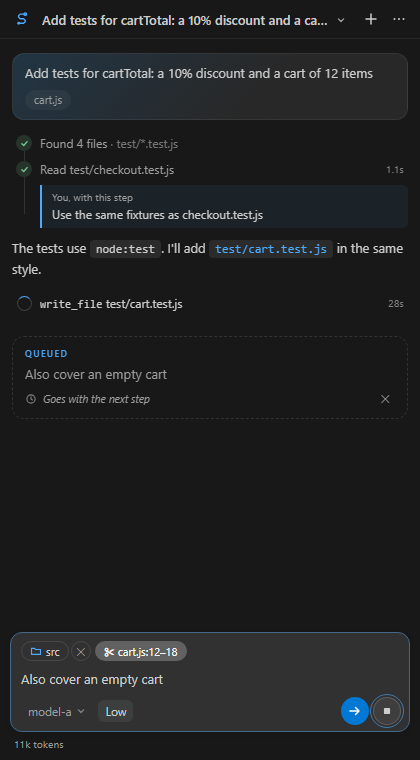
Add to it mid-task.
A message typed while it works waits for the next step.
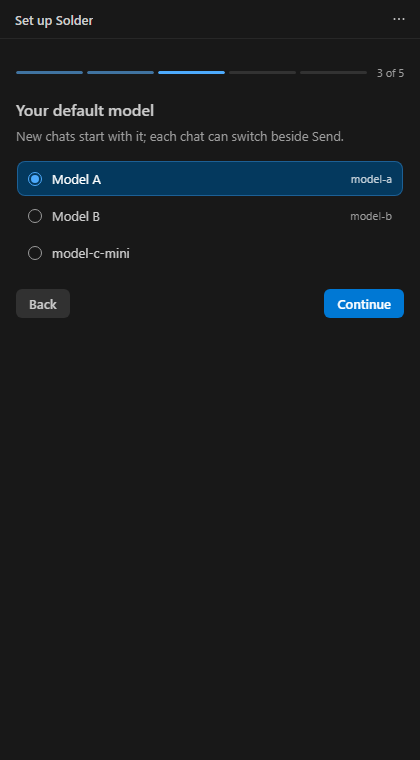
Set up in minutes.
The guided setup walks through the endpoint, key and model.
Your theme. Your colors.
Solder uses your VS Code theme’s colors, so it looks at home in light, dark and high contrast.
Your gateway. Your models.
Solder works with any OpenAI-compatible Chat Completions endpoint that supports tool calling.
Point it at your endpoint.
Your company’s gateway, or a server on your own PC. Give it the full Chat Completions address, ending in /chat/completions.
Add your key.
It’s kept in VS Code’s secret storage, never in settings. Solder checks it by listing the models.
Pick your models.
Choose a default, switch per chat beside Send, and set the effort: Low, Medium or High. A filter can limit which models are offered.
Check the connection any time.
Solder: Check connection lists the models, makes one tool round trip, and reports each step.
Built for metered gateways.
Each step resends the whole chat, so Solder trims old tool output, leaves out earlier big file writes, and summarizes the older part of a chat once it passes 100,000 tokens (you can change this). If your daily allowance runs out, everything is saved; choose Resume once it resets.
It talks to
your endpoint. Only.
Only your endpoint.
Solder contacts only the endpoint you set. There's no telemetry, no update check and no other network call, and the panel loads nothing from the internet.
What it sends.
Your messages, and the parts of your code and docs that the model reads for the task, go to your endpoint and nowhere else.
Your key stays in VS Code’s secret storage.
It's never written to settings.
Your chats stay on your PC.
They're saved per workspace in VS Code's storage for Solder.
Your docs index stays on your PC.
It's built and refreshed locally. Only the passages the model reads are sent to your endpoint.
No shell.
Solder never starts PowerShell or any other shell, and has no tool for running commands. It tells you what to run.
It asks first.
Before deleting anything, or changing a file outside the workspace.
Every edit can be undone.
Step by step, and reviewed in VS Code's diff. VS Code's own Ctrl+Z works too.
Install. Set up. Ask.
Install it.
Use the Marketplace link for Solder by Gremnar. On a PC without Marketplace access, install a Solder .vsix file through your approved channel: Extensions view → ⋯ → Install from VSIX…, or code --install-extension solder-<version>.vsix.
Run the guided setup.
Solder offers it the first time it starts. It’s always in the panel’s ⋯ menu → Guided setup…. Add your endpoint, API key and default model. Docs folders and a few rules about you and your code are optional.
Ask.
Open Solder from the side bar, or press Ctrl+Shift+; (Cmd+Shift+; on a Mac). Type and press Enter, or pick a card on a new chat.
A new chat for each new task is the cheapest habit.
- VS Code 1.100 or later.
- An OpenAI-compatible Chat Completions endpoint that supports tool calling, and its API key.
- A trusted workspace folder.
Solder by Gremnar
Extension ID: gremnar.solder · MIT licensed.
Straight answers.
No account number.
Security and data
Does Solder send data anywhere except my endpoint?
No. It contacts only the endpoint you set. There's no telemetry, no update check and no other network call.
What does my endpoint receive?
Your messages, and the parts of your code and docs that the model reads to do the task.
Where is my API key kept?
In VS Code's secret storage, never in settings.
Can it run commands or scripts?
No. Solder has no shell. When something needs building or testing, it tells you what to run.
Can it delete files?
Only after asking you. Deletes, moves and edits can all be undone.
Using it
Which models does it work with?
Any model your endpoint offers that supports tool calling.
Which docs can it search?
Plain text, code and headers (UTF-8 or UTF-16), and Word, Excel and PowerPoint files (.docx, .xlsx, .pptx and their macro versions). Not PDFs, images, scans, or the old .doc, .xls and .ppt formats. Files over 5 MB (40 MB for Office files) are skipped, as is anything beyond 20,000 files in one folder.
What if my connection drops, or I stop it?
Resume carries on from the last finished step, so nothing that's done is lost.
It says it can’t reach the endpoint.
Run Solder: Check connection from the command palette. It reports each step in the Solder output.
Your editor.
Your endpoint.
Install Solder from the Marketplace, run the guided setup, and ask your first question.